v0.9.5



Current: v0.9.5 for Mac (pre-release)
v1.0 for Mac, iOS & iPadOS coming soon (no longer an experiment)
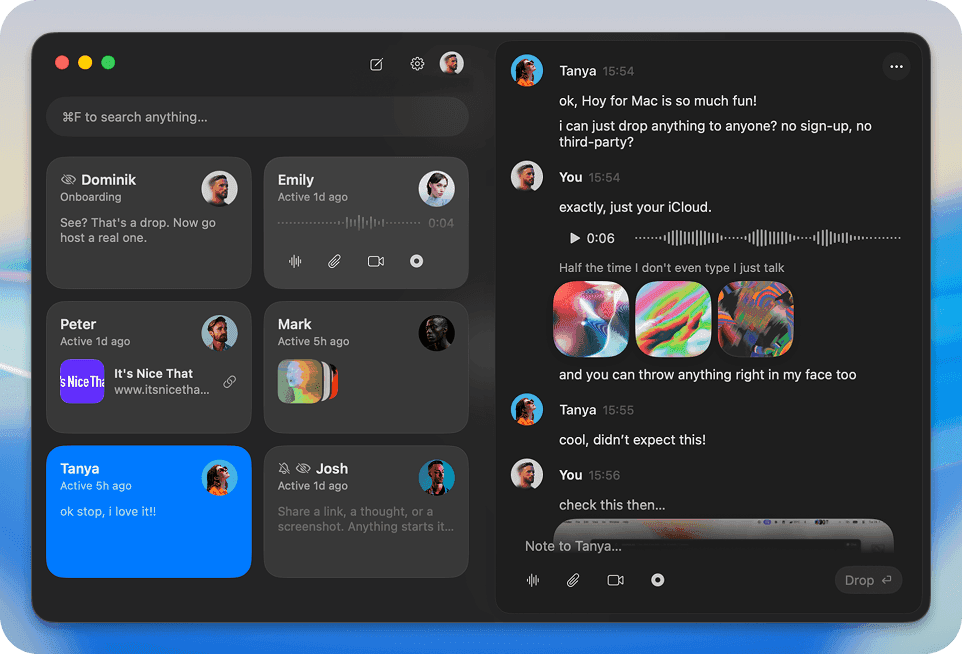
Send
a
quick
note
,
say
it
with
voice
,
show
it
with
video
,
walk
them
through
it
on
your
screen
,
or
just
drop
the
files
right
from
your
menu
bar.
No
window
juggling,
no
switching
apps.
Host on your iCloud
Invite-only channels
1:1 or group channels
See who's around
Hosting a channel means full control. You manage the members, the privacy, the history. It lives on your iCloud storage. No third party.
Joining someone else's channel is just accepting an invite. You can drop whatever you want in there; you just don't get the controls since everything lives on their iCloud.
Hoy is free. You can join unlimited channels, and host 3 channels, plus your own personal space for notes.
Want to host more than 3 channels?
PRE-RELEASE PRICE
And that's the fun part. I use it every day and I know the concept is strong - but it's young, and it will evolve a lot. I'm still learning what people reach for it most, so tell me: how you use it, what's missing, what feels off. Ideas, bugs, anything…
Email me
Love it already? Send an invite.
That's how Hoy spreads.
Current: v0.9.5 for Mac (pre-release)
v1.0 for Mac, iOS & iPadOS coming soon (no longer an experiment)
Hoy is built directly on CloudKit, Apple's own sharing framework. There is no Hoy server: drops travel from your device to theirs through iCloud and nothing else.
So how does it actually work?
Like a shared album in Photos. Same mechanism, all Apple.
When you create a channel it lives in your iCloud and you're the host. Share the invite link and whoever accepts can drop things in. Everything syncs to everyone in the channel, exactly the way a shared album syncs photos.
Being the host means you manage it: the members, the privacy, the history. Everyone else can drop whatever they like and delete their own drops, but the channel itself stays yours. Joining someone else's is just accepting an invite, so you get all the same sending, just not the controls, since it lives on their iCloud.
One practical note: channels count against the host's iCloud storage, same as a shared album does.
Hoy is Apple-only and needs an iCloud account - on both ends. If you and your people aren't on Apple devices, Hoy isn't your tool.